![New RABco Logo2.png]](https://university.rabcopayroll.com/hs-fs/hubfs/All%20MEDIA-%20Videos%20and%20Images/Logo%20and%20Images/New%20Logo%202021/New%20RABco%20Logo2.png?height=40&name=New%20RABco%20Logo2.png)
Here you will create the types of credentials that you want to track on employees.
 to return to the list of credential types.
Assigning and Tracking on Employees:
- Select Menu
 > Admin
  > HR Setup > Credential Types
 - Select

- Complete the window that opens (example below):
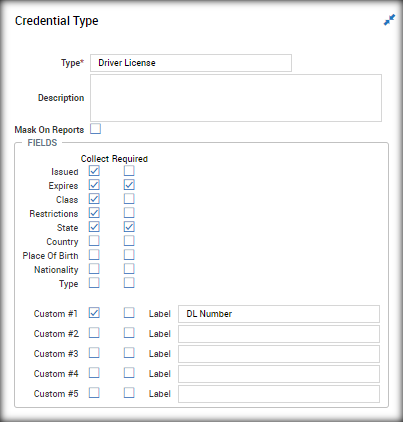
- Select .
to return to the list of credential types. Assigning and Tracking on Employees:
- Select Menu
> Team > My Team > Employee Information
2. Select the appropriate employee
Locate the “Credentials (Ex: Driver License)” widget, on the HR tab: 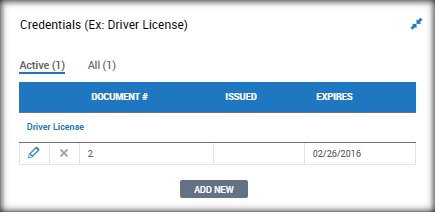
3. Select 
4. A pop-up will open, select the correct credential type: 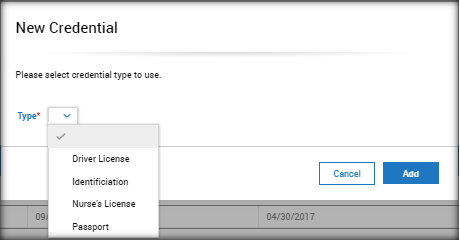
5. Select  .
.
6. Complete the credential information: 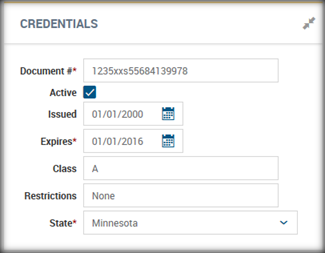
7. Select .
.
8. Once saved, additional notes and supporting documents can be added.
9. Select to return to the list of credential types.